> ## Documentation Index
> Fetch the complete documentation index at: https://visual-layer-mintlify-b738e5e2.mintlify.site/llms.txt
> Use this file to discover all available pages before exploring further.

# Dataset Interface Reference

> A complete reference to every tab, panel, control, and action in the Visual Layer dataset workspace.

The **Dataset Interface Reference** catalogs every element of the dataset workspace in Visual Layer. Use it to look up what a specific control does, where it lives, and which actions it supports. For a task-oriented walk-through of the same surface, see [Exploring Datasets](/docs/quick-start/dataset-exploration-ux).

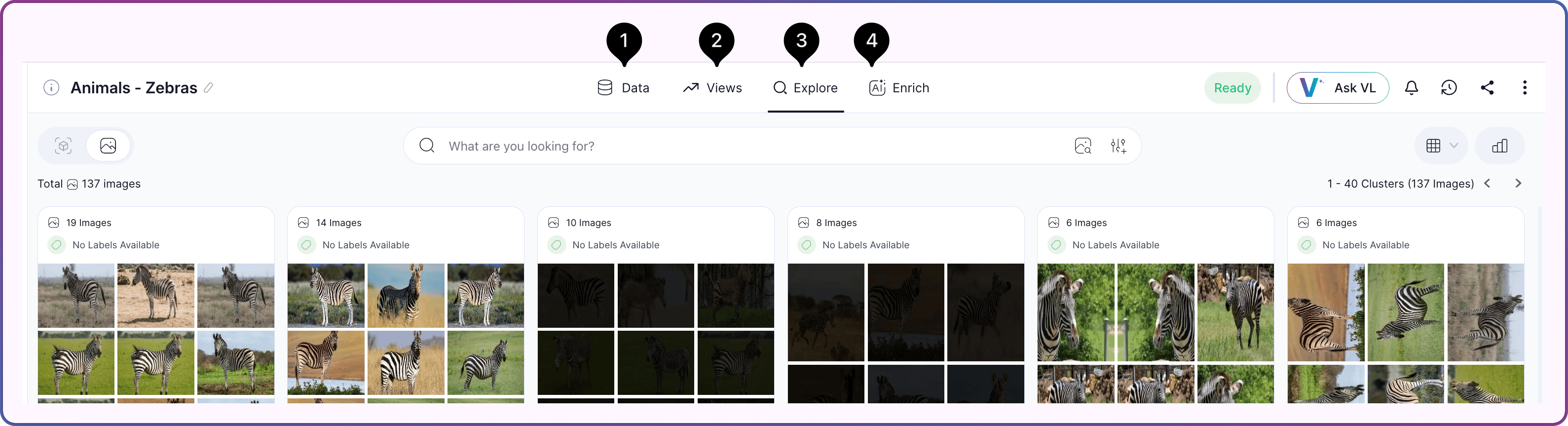
Click any dataset in the [Dataset Inventory](/docs/quick-start/dataset-inventory-ux) to open the dataset workspace. The workspace organizes all dataset work into four top-level tabs.

<Frame>
  <img src="https://mintcdn.com/visual-layer-mintlify-b738e5e2/LkOscXDR3cGm1O8Q/images/dataset-tabs.png?fit=max&auto=format&n=LkOscXDR3cGm1O8Q&q=85&s=8f5608f3c913305ed73f06e2e6466d82" alt="Dataset workspace tab bar showing the Data, Views, Explore, and Enrich tabs" width="3178" height="863" data-path="images/dataset-tabs.png" />
</Frame>

## Interface Layout

The dataset workspace is divided into four tabs. Each tab hosts a distinct set of controls, panels, and actions, and each has its own reference page.

<div className="integrations-table">
  | #                                                                                                                                                                                                                                                                                                                                                                                                                                                                                                                                                                                                                                                                                                                                                                                                                                                                                                                                                                                                                                                                                                                                                                                                                                                                                                                                                                                                                                                                       | Tab                                                                   | Description                                                                                                                 |
  | ----------------------------------------------------------------------------------------------------------------------------------------------------------------------------------------------------------------------------------------------------------------------------------------------------------------------------------------------------------------------------------------------------------------------------------------------------------------------------------------------------------------------------------------------------------------------------------------------------------------------------------------------------------------------------------------------------------------------------------------------------------------------------------------------------------------------------------------------------------------------------------------------------------------------------------------------------------------------------------------------------------------------------------------------------------------------------------------------------------------------------------------------------------------------------------------------------------------------------------------------------------------------------------------------------------------------------------------------------------------------------------------------------------------------------------------------------------------------- | --------------------------------------------------------------------- | --------------------------------------------------------------------------------------------------------------------------- |
  | <img src="https://mintcdn.com/visual-layer-mintlify-b738e5e2/LkOscXDR3cGm1O8Q/images/1light.png?fit=max&auto=format&n=LkOscXDR3cGm1O8Q&q=85&s=292881e93ae416534c80552836c2f085" className="img-marker" alt="1" width="126" height="126" data-path="images/1light.png" /> | [**Data**](/docs/explore-and-search/dataset-interface-data-tab)       | The dataset's setup and status surface — creation checklist, media preview, and activity log                                |

  | <img src="https://mintcdn.com/visual-layer-mintlify-b738e5e2/LkOscXDR3cGm1O8Q/images/2light.png?fit=max&auto=format&n=LkOscXDR3cGm1O8Q&q=85&s=b1ed121d3d00698a7b96d955006ae804" className="img-marker" alt="2" width="126" height="126" data-path="images/2light.png" /> | [**Views**](/docs/explore-and-search/dataset-interface-views-tab)     | Saved combinations of filters and search queries, plus monitoring and sharing controls                                      |

  | <img src="https://mintcdn.com/visual-layer-mintlify-b738e5e2/LkOscXDR3cGm1O8Q/images/3light.png?fit=max&auto=format&n=LkOscXDR3cGm1O8Q&q=85&s=d6a726e5c70e72a5352672568f1b18a8" className="img-marker" alt="3" width="126" height="126" data-path="images/3light.png" /> | [**Explore**](/docs/explore-and-search/dataset-interface-explore-tab) | The primary workspace for viewing and analyzing dataset content — clusters, search, filters, quality signals, and selection |

  | <img src="https://mintcdn.com/visual-layer-mintlify-b738e5e2/LkOscXDR3cGm1O8Q/images/4light.png?fit=max&auto=format&n=LkOscXDR3cGm1O8Q&q=85&s=1fb5dccd5ef7edf7ea271dc161e75675" className="img-marker" alt="4" width="126" height="126" data-path="images/4light.png" /> | [**Enrich**](/docs/explore-and-search/dataset-interface-enrich-tab)   | Model selection and progress tracking for AI-driven enrichment of the dataset                                               |

</div>

## Related Resources

<CardGroup cols={2}>
  <Card title="Exploring Datasets" icon="search" href="/docs/quick-start/dataset-exploration-ux">
    High-level orientation to the dataset workspace and the exploration workflow
  </Card>

  <Card title="How Search & Filter Work" icon="scan-text" href="/docs/explore-and-search/explore-theory">
    Concepts behind semantic search, visual similarity, and quality signals
  </Card>

  <Card title="How to Search & Filter" icon="sliders-horizontal" href="/docs/explore-and-search/using-search-filter">
    Step-by-step guide to running searches and filters
  </Card>

  <Card title="About the Dataset Inventory" icon="layout-dashboard" href="/docs/quick-start/dataset-inventory-ux">
    The home page you land on before opening a dataset
  </Card>
</CardGroup>
